Don't like banners? Log in and we will make sure you see no banners. For free.
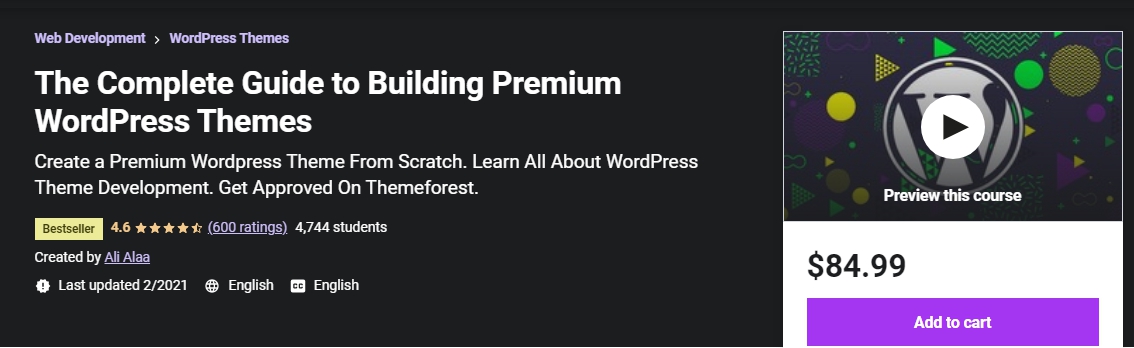
Udemy - The Complete Guide to Building Premium WordPress Themes 2021-2 [AhLaN]

Udemy - The Complete Guide to Building Premium WordPress Themes 2021-2 [AhLaN]

Size
10.7 GB
Seeders
0
Leechers
0
Files
99
Category
Added
at 11:44am GMT+1
Infohash
3d6f85801925c862bab0b38ad073419c0be44d70
Don't like banners? Log in and we will make sure you see no banners. For free.

Description
---------------------------------------------------------------------------------

-----------------------------------------------------------------------------------
Proudly Presents
-----------------------------------------------------------------------------------
Udemy - The Complete Guide to Building Premium WordPress Themes 2021-2 [AhLaN]



** About The Course **

Build A Premium Wordpress Theme : Create Wordpress Themes : How To Create A Premium Wordpress Theme From Scratch For Themeforest

In this course, you will learn everything you will need to create premium WordPress themes that are guaranteed to get accepted on marketplaces like themeforest.

Become a WordPress themes expert and make money online by publishing your themes!

Understand WordPress concepts in more depth and learn how things work behind the scenes.

Create a secure Wordpress theme that is guaranteed to pass themeforest's security review.

Learn how to make your theme translatable.

Explore some advanced JavaScript workflows that will help you automate regular tasks like minifying CSS.

Understand WordPress's actions and filters.

Make your themes modifiable by understanding child themes.

Add powerful options to your theme using the powerful WordPress Customizer API.

Make your theme compatible with the new WordPress editor 'Gutenberg'

Explore web accessibility and get some tips on how to make your theme more accessible.

Create WordPress plugins that will supplement your theme.

Learn everything about WordPress functionalities like: sidebars, navigation menus, custom fields, shortcodes, post formats, custom post types, custom taxonomies, custom widgets and more.

Take your WordPress knowledge to the next level

Are you looking to code premium WordPress themes that will pass the coding standards review on websites like themeforest?

Do you have great designs or you work with a designer and you have HTML/CSS/JS/PHP knowledge and you want to convert your designs into great WordPress themes?

Do you have some WordPress knowledge and you want to expand your knowledge and get deeper into the word of WordPress and be able to sell themes online?

Then this course is for you!

This course is the essence of my experience with submitting themes to themeforest. In these lectures, I will share everything I know about creating WordPress themes. After completing the course you will be able to create themes coded to match WordPress's and Themeforest's coding and security standards. You should have no problems passing themeforest's code review as long as you have a great design!


This is not a Design/CSS/HTML/PHP course!!! If you are looking for that, I am sure you will find a lot of other resources. In this course I will just focus on WordPress functionality. I will load some prewritten basic CSS I did for the theme that we will create, the goal is just to create WordPress functionality and understand WordPress in more depth. I will however teach you how to organize your CSS, compile SASS and minify your files automatically. Also you should have some basic PHP knowledge. I will not teach you PHP from scratch here, so if you are interested in taking this course, I suggest taking a beginners PHP course first!

Who is the target audience?

Developers who have HTML/CSS/JS/PHP knowledge and wish to create professional WordPress themes from scratch.

WordPress developers who want to take their WordPress knowledge to the next level.

WordPress developers looking to create premium themes that get approved on websites like themeforest.

Anyone interested in learning advanced WordPress and Javascript concepts.

#wordpresstheme #createpremiumwordpresstheme #buildwordpressthemes

Who this course is for:
Developers who have HTML/CSS/JS/PHP knowledge and wish to create professional WordPress themes from scratch.
WordPress developers who want to take their WordPress knowledge to the next level.
WordPress developers looking to create premium themes that get approved on websites like themeforest.
Anyone interested in learning advanced WordPress and Javascript concepts.


File list
  • Udemy - The Complete Guide to Building Premium WordPress Themes 2021-2 [AhLaN]
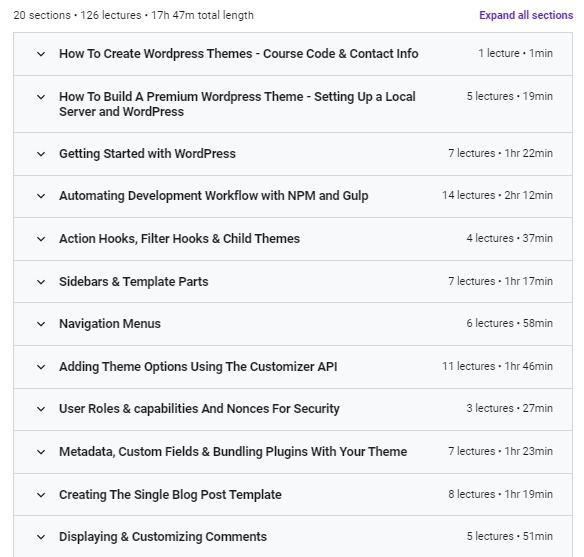
  • 01 How To Build A Premium Wordpress Theme - Setting Up a Local Server and WordPress/002 Installing a Local Server.mp4 40 MB
  • 01 How To Build A Premium Wordpress Theme - Setting Up a Local Server and WordPress/003 Installing a New WordPress Website.mp4 27.1 MB
  • 01 How To Build A Premium Wordpress Theme - Setting Up a Local Server and WordPress/004 First Steps to Creating a Theme.mp4 67.9 MB
  • 01 How To Build A Premium Wordpress Theme - Setting Up a Local Server and WordPress/005 Quick Note.html 1.1 KB
  • 01 How To Build A Premium Wordpress Theme - Setting Up a Local Server and WordPress/006 Setting Up Development Environment.mp4 56.6 MB
  • 01 How To Build A Premium Wordpress Theme - Setting Up a Local Server and WordPress/external-assets-links.txt 417 B
  • 01 How To Create Wordpress Themes - Course Code & Contact Info/001 How To Create Wordpress Themes - Course Code & Contact Info.html 2.3 KB
  • 02 Getting Started with WordPress/007 Template Files & Template Tags.mp4 43.5 MB
  • 02 Getting Started with WordPress/008 Coding the Loop.mp4 108.6 MB
  • 02 Getting Started with WordPress/009 Understanding the Loop.mp4 132.6 MB
  • 02 Getting Started with WordPress/010 Template Hierarchy.mp4 32.4 MB
  • 02 Getting Started with WordPress/011 Functions in WordPress.mp4 61.2 MB
  • 02 Getting Started with WordPress/012 Validation, Sanitization & Escaping.mp4 113.8 MB
  • 02 Getting Started with WordPress/013 Internationalization & Localization.mp4 173 MB
  • 02 Getting Started with WordPress/external-assets-links.txt 430 B
  • 03 Automating Development Workflow with NPM and Gulp/014 Introduction to NPM & Gulp.mp4 40.4 MB
  • 03 Automating Development Workflow with NPM and Gulp/015 Setting Up NPM & Gulp.mp4 166.5 MB
  • 03 Automating Development Workflow with NPM and Gulp/016 Development vs Production in Gulp Tasks.mp4 53.6 MB
  • 03 Automating Development Workflow with NPM and Gulp/017 Creating A Gulp Task For Styles.mp4 149.1 MB
  • 03 Automating Development Workflow with NPM and Gulp/018 Creating A Gulp Task For Styles cont.mp4 138.6 MB
  • 03 Automating Development Workflow with NPM and Gulp/019 Compressing Images & Copying Files.mp4 140.6 MB
  • 03 Automating Development Workflow with NPM and Gulp/020 Cleaning Files & Serializing Tasks.mp4 166.2 MB
  • 03 Automating Development Workflow with NPM and Gulp/021 Webpack Update Note.html 3.1 KB
  • 03 Automating Development Workflow with NPM and Gulp/022 Creating A Gulp Task For JavaScript.mp4 219.4 MB
  • 03 Automating Development Workflow with NPM and Gulp/023 Creating A Gulp Task For JavaScript cont.mp4 106.7 MB
  • 03 Automating Development Workflow with NPM and Gulp/024 Adding JavaScript Plugins The Right Way.mp4 162.6 MB
  • 03 Automating Development Workflow with NPM and Gulp/025 Improving The Tasks With Browsersync.mp4 151 MB
  • 03 Automating Development Workflow with NPM and Gulp/026 Bundling Files For Production.mp4 106.4 MB
  • 03 Automating Development Workflow with NPM and Gulp/027 Creating a Replaceable Placeholder Prefix.mp4 72.1 MB
  • 04 Action Hooks, Filter Hooks & Child Themes/028 Creating Custom Action Hooks.mp4 61.6 MB
  • 04 Action Hooks, Filter Hooks & Child Themes/029 WordPress Core Actions.mp4 102.9 MB
  • 04 Action Hooks, Filter Hooks & Child Themes/030 Core & Custom Filter Hooks.mp4 62.6 MB
  • 04 Action Hooks, Filter Hooks & Child Themes/031 Creating Child Themes.mp4 150.1 MB
  • 05 Sidebars & Template Parts/032 Quick Note.html 1.4 KB
  • 05 Sidebars & Template Parts/033 Adding CSS Stylesheets Using The ITCSS Architecture.mp4 102.7 MB
  • 05 Sidebars & Template Parts/034 Including The CSS Styles In Our HTML.mp4 95.5 MB
  • 05 Sidebars & Template Parts/035 Creating Sidebars For Widgets.mp4 86.7 MB
  • 05 Sidebars & Template Parts/036 Creating Sidebars Dynamically.mp4 173.3 MB
  • 05 Sidebars & Template Parts/037 Organizing Your Templates With get_template_part().mp4 139.8 MB
  • 05 Sidebars & Template Parts/038 Coding The Header & The Search Form.mp4 131.1 MB
  • 05 Sidebars & Template Parts/external-assets-links.txt 523 B
  • 06 Navigation Menus/039 Registering & Displaying Navigation Menus.mp4 96.9 MB
  • 06 Navigation Menus/040 Styling & Filtering The Navigation Menu.mp4 104.8 MB
  • 06 Navigation Menus/041 Creating A Mega Menu.mp4 49 MB
  • 06 Navigation Menus/042 Adding The Markup For Menu Accessibility.mp4 146.9 MB
  • 06 Navigation Menus/043 Adding The JavaScript For Menu Accessibility.mp4 162.4 MB
  • 06 Navigation Menus/044 Improving Accessibility With Skip Links.mp4 30.2 MB
  • 06 Navigation Menus/external-assets-links.txt 73 B
  • 07 Adding Theme Options Using The Customizer API/045 WordPress Customizer Overview.mp4 81 MB
  • 07 Adding Theme Options Using The Customizer API/046 Creating Our First Theme Option.mp4 95.4 MB
  • 07 Adding Theme Options Using The Customizer API/047 Custom Sanitization For Theme Options.mp4 41.8 MB
  • 07 Adding Theme Options Using The Customizer API/048 Using postMessage For Better Customizer Updates.mp4 124.2 MB
  • 07 Adding Theme Options Using The Customizer API/049 Updating Using Selective Refresh.mp4 107 MB
  • 07 Adding Theme Options Using The Customizer API/050 Creating An Option For Footer Background.mp4 121.6 MB
  • 07 Adding Theme Options Using The Customizer API/051 Creating An Option For Footer Columns.mp4 97.8 MB
  • 07 Adding Theme Options Using The Customizer API/052 Creating An Option For The Logo.mp4 56.2 MB
  • 07 Adding Theme Options Using The Customizer API/053 Creating A Color Picker Option & Adding Inline CSS In WordPress.mp4 129.3 MB
  • 07 Adding Theme Options Using The Customizer API/054 Improving The Accent Colour Preview With JavaScript.mp4 45.5 MB
  • 07 Adding Theme Options Using The Customizer API/055 Passing Variables From PHP to JavaScript To Avoid Repetition.mp4 186.8 MB
  • 08 User Roles & capabilities And Nonces For Security/056 User Roles & capabilities Overview.mp4 63.4 MB
  • 08 User Roles & capabilities And Nonces For Security/057 Custom Delete Post Link Only For Permitted Users.mp4 97.2 MB
  • 08 User Roles & capabilities And Nonces For Security/058 Using Nonces To Verify Users' Intention.mp4 63.2 MB
  • 08 User Roles & capabilities And Nonces For Security/external-assets-links.txt 437 B
  • 09 Metadata, Custom Fields & Bundling Plugins With Your Theme/059 Introduction To Metadata & Custom Fields.mp4 78.9 MB
  • 09 Metadata, Custom Fields & Bundling Plugins With Your Theme/060 Adding Metaboxes & Custom Fields.mp4 135.2 MB
  • 09 Metadata, Custom Fields & Bundling Plugins With Your Theme/061 Securing Metaboxes & Adding More Fields.mp4 153.9 MB
  • 09 Metadata, Custom Fields & Bundling Plugins With Your Theme/062 Creating A Simple Plugin.mp4 103.3 MB
  • 09 Metadata, Custom Fields & Bundling Plugins With Your Theme/063 Moving The Metaboxes Code To Our Plugin.mp4 110.3 MB
  • 09 Metadata, Custom Fields & Bundling Plugins With Your Theme/064 Bundling Plugins With Your Theme Using TGMPA.mp4 234 MB
  • 09 Metadata, Custom Fields & Bundling Plugins With Your Theme/065 Adding A New Gulp Task To Copy Plugins.mp4 61.4 MB
  • 09 Metadata, Custom Fields & Bundling Plugins With Your Theme/external-assets-links.txt 169 B
  • 10 Creating The Single Blog Post Template/066 Creating The Layout For The Single Blog Post.mp4 107 MB
  • 10 Creating The Single Blog Post Template/067 Populating The Single Blog Post Content.mp4 128.1 MB
  • 10 Creating The Single Blog Post Template/068 Displaying The Post Author Info.mp4 109.4 MB
  • 10 Creating The Single Blog Post Template/069 Adding An Option To Show_Hide Author Info.mp4 109.2 MB
  • 10 Creating The Single Blog Post Template/070 Adding Posts Navigation To The Single Blog Post.mp4 68.8 MB
  • 10 Creating The Single Blog Post Template/071 Unit Tests For Blog Posts.mp4 89.9 MB
  • 10 Creating The Single Blog Post Template/072 Note For The Next Lecture.html 2.6 KB
  • 10 Creating The Single Blog Post Template/073 Tips For Supporting The New Editor _Gutenberg_.mp4 143.9 MB
  • 10 Creating The Single Blog Post Template/external-assets-links.txt 170 B
  • 11 Displaying & Customizing Comments/074 Displaying The Comments & Loading Necessary JS Files.mp4 94.9 MB
  • 11 Displaying & Customizing Comments/075 Creating A Custom Comments Template.mp4 100.6 MB
  • 11 Displaying & Customizing Comments/076 Coding A Custom Comment Callback.mp4 117.7 MB
  • 11 Displaying & Customizing Comments/077 Completing The Comment Callback & Unit Testing The Comments.mp4 72.1 MB
  • 11 Displaying & Customizing Comments/078 Making Our Comment Callback Child Theme Friendly.mp4 88.6 MB
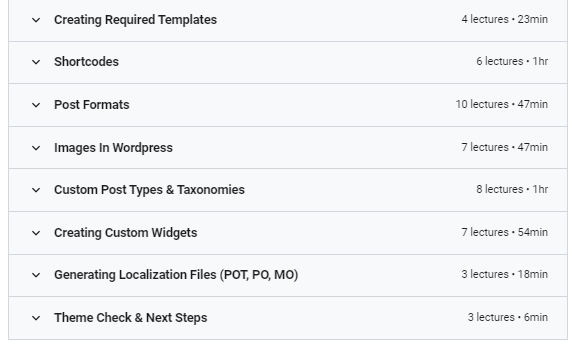
  • 12 Creating Required Templates/079 Creating A Template For The Author Archive.mp4 87.8 MB
  • 12 Creating Required Templates/080 The Search & 404 Templates.mp4 32.5 MB
  • 12 Creating Required Templates/081 Creating A Default Page Template.mp4 38.4 MB
  • 12 Creating Required Templates/082 Creating Custom Page Templates.mp4 34.1 MB
  • 13 Shortcodes/083 Creating A Simple Shortcode.mp4 94.1 MB
  • 13 Shortcodes/084 Enclosing Shortcodes & Filtering Attributes.mp4 64.4 MB
  • 13 Shortcodes/085 Moving Our Shortcodes To A Plugin.mp4 94.7 MB
  • 13 Shortcodes/086 Creating An Image Slider Shortcode.mp4 69 MB
  • 13 Shortcodes/087 Creating An Image Slider Shortcode cont.mp4 66.8 MB
  • 13 Shortcodes/088 Understanding & Solving The Empty P Tags Problem.mp4 215 MB
  • 14 Post Formats/089 Introduction To Post Formats.mp4 63.6 MB
  • 14 Post Formats/090 The Aside Post Format.mp4 28.1 MB
  • 14 Post Formats/091 The Link Post Format.mp4 28.8 MB
  • README.txt 2.2 KB

Rating
Not rated yet
Log in to rate

Comments

No comments yet.