


Description
Genuine cracked applications direct from the scene group.
A Team-FTU project!
32bit | 64bit | Multilingual | PreActivated
R-Drive Image System Recovery Media Creator v7.1 Build 7111 RePack & Portable [FTUApps]
R-Drive Image is an effective utility for creating disk image files and backing up data. A disk image file containing an exact "byte for byte" copy of a hard drive, partition or logical drive can be created without restarting the computer and with various levels of data compression. The created disk image can be saved on various types of media, including removable media such as CD-R(W)/DVD, Iomega Zip and Jazz discs.
Additional Information:
Using R-Drive Image, you can quickly and completely restore your system after total data loss caused by a system crash, virus attack, or computer hardware failure.
R-Drive Image is one of the best backup and recovery utilities for preventing catastrophic data loss after irreparable operating system or hardware failures.
Features of R-Drive Image:
- Simple and convenient user interface. Almost all actions can be performed with a few clicks of the mouse, no in-depth knowledge of computer management is required.
- Multilingual User Interface: English, French, Spanish, German, Russian, Portuguese, Traditional and Simplified Chinese and Japanese.
- Support for SMART alerts. If a hard drive is at risk of possible hardware failure, its SMART (Self-Monitoring, Analysis and Reporting Technology) system issues special warnings. R-Drive Image displays these warnings and includes them in emails about the progress of operations.
- Create images from individual files, not just from disk objects. Batch Mode: Advanced file filtering to make it easier to find and tag files. File filters can be created directly from the R-Drive Image panel or created manually.
- Support for rotation schemes (further development of backup sets): A set of files (usually a file for a full image of an object and a number of its differential / incremental images) that R-Drive Image processes as a whole. Such sets are stored for some specific time and are replaced by new ones according to certain rules. Rotation schemes are used to flexibly manage the parameters of complex backup tasks. R-Drive Image supports predefined and custom schemes. Custom schemes are available in Corporate, Technician and Commercial licenses.
- Mounting virtual disks allows you to mount the created image files as virtual disks (read-only), and all files on such disks are available to Windows and other programs.
- Detailed and versatile logs available directly from the user interface.
- System Cloning: R-Drive Image can be used for bulk system cloning. You can manually configure one system, create an image of it, and then deploy that image to other computers, saving time and money.
- The OEM System Recovery (System Recovery Disk) is part of the R-Drive Image OEM kit for launching a program from a boot disk and restoring a damaged computer system to its original state. It can also be done from a CD, DVD, USB, ZIP or other removable drive.
General information:
Type: Unpacking, Installer and Portable
Languages: Multilingual
Activation: Predone, already treated
Additional: import Settings.reg
Command line parameters:
Silent installation: /S /I
Unpacking portable: /S /P
Do not create shortcuts on the desktop: /ND
Do not create shortcuts in the Start menu: /NS
Select installation location: /D=PATH
The /D=PATH parameter should be the last
parameter Example: R-Drive.Image.v6.3.6306.exe /S /I /D=: MyProgram
What's New:
- https://forum.r-tt.com/viewtopic.php?t=5039
Operating System:
- Windows 11/10/8.1/8/7/Vista/XP Windows Server 2022/2019/2016/2012/2008/2003 (32bit + 64bit versions)
- An Intel compatible platform.
- Administrator rights are required to install and run R-Drive Image.
Files Inside The Zip:
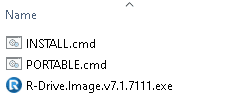
Homepage: https://www.drive-image.com/
Unzip, Run, Unpack, Installer or Portable & Enjoy, No activation is required / Instruction is Included in the folder!
AntiVirus Scanned Result for User-End >>>
File: https://www.virustotal.com/gui/file/0ae757b227e397f6d277f84f4eb4002bd492ac5f20bf76db492b868661cffcc7/detection
- Read the False-Positive Infection guidance on web, get knowledge before making noise!

!! NOTE !! Always check it's FTUApps release! Avoid FAKE!
Our Aim is to provide cleanest, harmless applications with tested app screenshot!
File list
- R-Drive Image System Recovery Media Creator v7.1 Build 7111 RePack & Portable


Rating
Similar torrents
| Name | Size | Date | |||
|---|---|---|---|---|---|
| 106 MB | 10/13/24 | 1 | 0 | ||
| 103 MB | 10/13/24 | 0 | 0 | ||
| 103 MB | 07/10/23 | 0 | 0 | ||
| 104 MB | 03/23/23 | 0 | 1 | ||
| 87 MB | 04/12/22 | 0 | 1 | ||
| 74 MB | 07/27/19 | 0 | 1 |