No cover art


Description
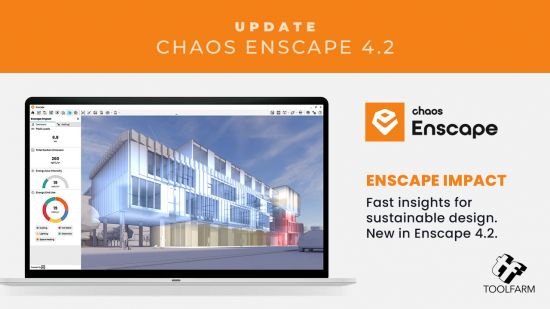
The real-time technology visualizes your project as a fully rendered 3D walkthrough that can be navigated and explored from every angle. You can follow every update to your plan instantly thanks to the bi-directional geometry exchange between your CAD or BIM program and the renderer. Use NVIDIA Deep Learning Super Sampling support to improve performance in walkthroughs.
Virtual reality
Explore your design in the compelling realism of virtual reality. Connect a VR headset like the Meta Quest 3 or HTC Vive Pro 2, and get ready to walk or fly through your project. You won’t believe the extraordinary experience it will evoke.
NVIDIA Denoiser
Boost the quality of your walkthroughs and capture exports with the advanced denoising solution powered by NVIDIA ReLAX denoiser. Enjoy sharpness and clarity in enclosed interior spaces with minimal direct light, particularly on glossy or metallic surfaces.
V-Ray scene exporter
Transfer key data from Enscape to V-Ray and other design applications, including 3ds Max and Cinema 4D with .vrscene files. From early design to final production, avoid duplication of work and collaborate better with project stakeholders.
Chaos AI Enhancer
This functionality leverages AI to improve Enscape assets, specifically people and vegetation assets. Simply focus on designing and let AI elevate your visuals. Easily upload, enhance, and share images via Chaos Cloud while continuing to work in Enscape, saving time and maintaining productivity.
Get professional-level quality images without interruptions or performance loss to your Enscape workflow.
Share elevated visualizations to get your design intent across faster.
Integrated Graphics Support
Enscape can now be used on Windows computers with Intel and AMD iGPUs (integrated graphics processing units), as it is accessible to more than just computers with separate physical GPUs. This is great if you’re budget-constrained or can’t purchase a machine without a dedicated GPU.
Use Enscape while working on-site or while traveling
Enjoy a more flexible and cost-effective way of visualizing
Chaos Cloud
This integration lets you perform every step of the design review process on Chaos Cloud. Upload panoramas and renders, and make annotations directly on your visualizations with markup tools. You can also assign floor plans and use a mini-map to assist with tour navigation.
Easily collaborate with your team and peers in one place
Let clients explore designs with advanced virtual tours
Site context
Eliminate the lengthy processes of modeling topography and importing geometry with the Site Context mode. See what your building will look like on-site and make better decisions with real-world context added.
Material library
Access more than 425 predefined high-quality materials in the Enscape Material Library. Communicate your design aesthetic and improve the realism of any scene with little effort.
Asset library
Our ever-expanding Asset Library will help you to fill your scene with life and make it even more realistic. Browse through just a small selection of our collection, so you can get a feel for the available models. We’re always adding more.
Clouds
Get wind of Enscape’s cloud settings: adjust the cloud density and variety to perfect the ambiance and feel of your scene. Depending on your defined parameters, the rendering will appear brighter or darker, and the clouds thicker or thinner. Adjust the time of day to see the clouds travel across the dynamic Enscape sky.
White mode
Start with a clean slate: if you want your audience to focus on the architecture rather than materials or colors, switch on White Mode. All colors are set to white, while other parameters like glossiness and bump are maintained to preserve the natural appearance of the scene.
The Enscape plug-in is provided for the following host applications
Revit 2022, 2023, 2024, and 2025
SketchUp 2022, 2023 and 2024
Rhino 7.0 and 8.3 (or later)
Archicad 25, 26, 27 and 28
Vectorworks 2022, 2023 (Service Pack 1 or later), 2024 and 2025
System Requirements
Operating system: Windows 10 or higher
Graphics card: NVIDIA or AMD dedicated GPU with 4GB VRAM that supports Vulkan 1.1
NVIDIA GeForce GTX 900 series / Quadro M series and newer
AMD Radeon RX 400 series / equivalent Radeon Pro series and newer
VRAM: 4GB VRAM
Unsupported hardware: Radeon 6000 mobile GPU’s
Intel Integrated Graphics onboard GPU’s SLI
Crack VT Link: https://www.virustotal.com/gui/file/393be8e3736e22e0db8b91c07a849d3db284864c28a2a25020cf2a075bca4b64
File list
- Chaos Enscape 4.6.0.451 (x64)


Rating
Similar torrents
| Name | Size | Date | |||
|---|---|---|---|---|---|
Chaos Enscape 4.14.0.668 (x64) in Software | 731 MB | 01/23/26 | 40 | 0 | |
Chaos Enscape 4.18.0.1529 (x64) in Software | 766 MB | 07/15/26 | 35 | 0 | |
Chaos Enscape 4.3.0.1189 (x64) in Software | 662 MB | 02/10/25 | 32 | 1 | |
Chaos Enscape 4.19.0.2748 (x64) Verified in Software | 792 MB | 08/09/26 | 23 | 1 | |
Chaos Enscape 4.17.0.1175 (x64) in Software | 722 MB | 07/19/26 | 22 | 0 | |
Chaos Enscape 4.10.0.464 (x64) in Software | 711 MB | 09/08/25 | 20 | 1 | |
Chaos Enscape v4.13.0.619 (x64) Verified in Software | 719 MB | 11/18/25 | 18 | 0 | |
Chaos Enscape 4.11.0.162 (x64) in Software | 711 MB | 11/17/25 | 17 | 0 | |
Chaos Enscape 4.7.0.57 (x64) in Other | 683 MB | 05/29/25 | 9 | 0 | |
Chaos Enscape 4.18.0.1529 (x64) in Software | 765 MB | 06/28/26 | 7 | 0 | |
Chaos Enscape 4.3.0.1186 (x64) in Software | 661 MB | 02/03/25 | 5 | 0 | |
Chaos Enscape 4.10.0.464 (x64) in Software | 710 MB | 11/18/25 | 4 | 0 | |
Chaos Enscape 4.12.0.204 (x64) in Software | 711 MB | 11/19/25 | 3 | 0 | |
Chaos Enscape 4.11.0.162 (x64) Verified in Software | 711 MB | 10/08/25 | 3 | 0 | |
Chaos Enscape 4.17.0.1175 (x64) in Software | 723 MB | 07/19/26 | 1 | 0 |