No cover art


Description
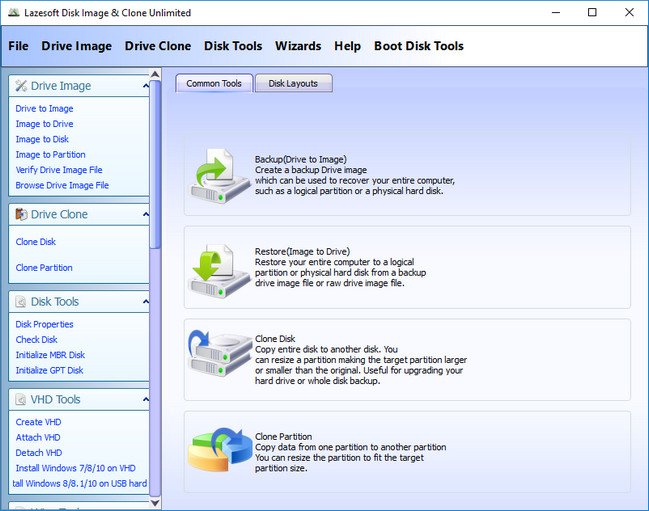
Lazesoft Disk Image & Clone may be used for backups, hard disk upgrades or disk duplication purposes. Your hard disk is full, you need to upgrade to a new hard disk? You think you are facing a large re-installation project which is likely to take several days of tedious work. With Lazesoft Disk Image & Clone, Clone/copy entire disk including Windows, programs, files and personal settings to a new disk/partition in several clicks. Never need to reinstall Windows and programs.
Need to backup your System safely?
With Lazesoft Disk Image & Clone, your can backup your entire system or disk to image files safely on offline, or clone your entire disk to another for backup.
Has options to create WinPE 3.5, 4.0, 5.0, 10 32 and 64 bit PE Recovery Disk
Added Start Menu on boot disk
Options to set screen resolution in the boot disk
Add Network Interface Card Drivers in the boot disk
Upgrade, Clone disk/Partition
- Clone an old hard disk drive to a new large one.
- copy system partition to a new SSD drive.
- Easy to use wizard-driven interface.
- Partitions can be copy either with original sizes and locations, or Resizes transferred partitions to match new hard disk size.
- Clone with fast mode (Only copy used blocks) or complete mode (sector by sector copy).
- Support any types of hard disks like SATA, IDE, SSD, USB.
- Support FAT, FAT32, NTFS file systems.
- Includes special sector-by-sector support for other partitions and corrupted file systems.
- When partitions are copied an original hard disk remains unchanged.
Backup and Restore
- Create Backup Disk Image (occupied clusters only)
- Create Raw Disk Image (sector by sector copy)
- Image files compression
- Supports FAT16, FAT32, NTFS file systems
- Other partitions and corrupted file systems can be backup with sector-by-sector.
- Auto splitting into 4GB size chunks for FAT32 destination partition.
Partition Management
- Creates FAT, FAT32, NTFS partitions.
- deletes any types of partitions.
- Format FAT, FAT32, NTFS partitions.
- Hide/unhide partition.
- Set active partition.
Wipe Disk or Partition
- Securely wipe entire disk.
- Wipe multiple partitions even if system partition.
- Has quick mode and deep mode.
- Wipe any types of partitions.
- Support GPT, MBR and Dynamic volumes.
Whats New
System Requirements:
Windows 7 and later
https://www.virustotal.com/gui/file/2dc1b2bf569cf7f80e927c411ed39152927c301af0c9f2c3b41ef0fef4a7f6b7
https://www.virustotal.com/gui/file/6d3e130bc68d60abacccfce36f86a6a15cbab2d61eb2bfcea27751de34fa3053
File list
- Lazesoft Disk Image and Clone 5.3.0.1 Unlimited


Rating
Similar torrents
| Name | Size | Date | |||
|---|---|---|---|---|---|
| 134 MB | 03/22/19 | 0 | 1 | ||
| 613 kB | 01/07/19 | 0 | 1 | ||
| 137 MB | 12/31/18 | 0 | 1 | ||
| 612 kB | 09/06/18 | 0 | 1 | ||
| 134 MB | 07/22/18 | 0 | 1 | ||
| 134 MB | 07/07/18 | 0 | 1 | ||
| 134 MB | 05/29/18 | 0 | 0 | ||
| 134 MB | 05/26/18 | 0 | 0 | ||
| 134 MB | 05/23/18 | 0 | 1 | ||
| 134 MB | 05/19/18 | 0 | 1 | ||
| 134 MB | 03/06/18 | 0 | 1 | ||
| 134 MB | 05/03/17 | 0 | 1 |